Workspace & Desk Ergonomic Support Products
-
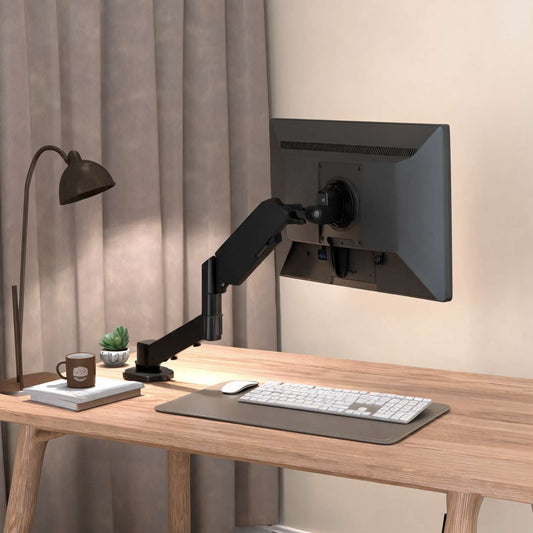
Sanco T1 Monitor Arm Desk Clamp Mount for 17-35 Inch Screens
Regular price $54Regular price$150Sale price $54Sale -
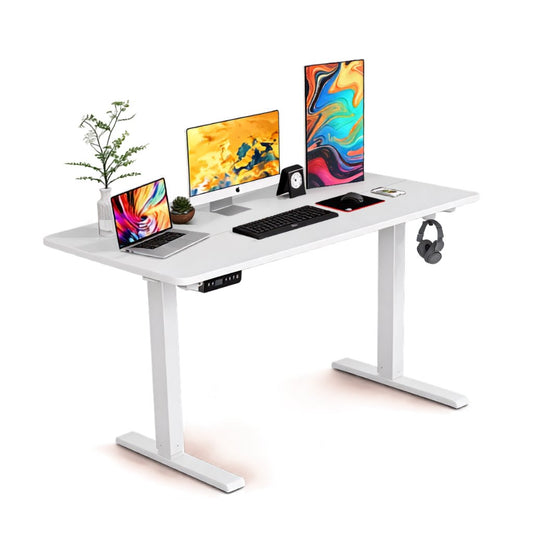
Electric Height Adjustable Standing Desk for Home Office
Regular price $980Regular price$2,000Sale price $980Sale
Workspace
Workspace and desk ergonomic support products are designed to make long hours of sitting, typing, studying, and working more comfortable. At Vendula Care, explore practical ergonomic cushions, back supports, footrests, posture aids, and desk accessories that can help support better sitting habits and reduce everyday strain at home or in the office.
Why Ergonomic Support Matters at Your Workspace
A poorly arranged workspace can place unnecessary pressure on your lower back, neck, shoulders, wrists, and legs. Ergonomic support products help create a more comfortable setup by improving body positioning and providing targeted support where you need it most.
Support Better Sitting Posture
Ergonomic desk accessories can help you maintain a more natural sitting position throughout the workday.
They may help support:
-
Neutral spine alignment
-
Comfortable shoulder positioning
-
Better lower-back support
-
Improved foot placement
-
Reduced pressure from prolonged sitting
Comfort During Long Workdays
Small improvements to your chair and desk setup can make extended work sessions easier to manage, especially for people working from home or sitting at a computer for several hours.
Everyday Ergonomic Improvements
Pair supportive products with regular movement, proper desk height, and frequent posture changes for a more balanced workspace.
Ergonomic Seat Cushions for Desk Chairs
An ergonomic seat cushion can improve comfort on office chairs that feel too firm, flat, or unsupportive.
Coccyx and Pressure-Relief Cushions
Contoured seat cushions are designed to distribute sitting pressure more evenly and may reduce direct pressure around the tailbone and hips.
Common features include:
-
Memory foam construction
-
Coccyx cutout designs
-
Breathable covers
-
Non-slip bases
-
Portable construction
Who May Benefit From a Desk Seat Cushion?
Seat cushions can be useful for remote workers, office employees, students, gamers, and anyone who spends extended periods sitting.
| Feature | Potential Benefit |
|---|---|
| Memory foam | Conforms to your sitting position |
| Coccyx cutout | Reduces direct tailbone pressure |
| Non-slip base | Helps keep the cushion stable |
| Removable cover | Makes cleaning easier |
| Portable design | Suitable for office, home, or travel |
Lumbar Support for Lower Back Comfort
Lumbar support products are designed to support the natural inward curve of the lower spine while you sit.
Lumbar Cushions for Office Chairs
A lumbar cushion can fill the space between your lower back and chair, helping you avoid slouching or collapsing backward into the seat.
Lumbar supports may be useful for:
-
Desk chairs
-
Home office chairs
-
Dining chairs used for work
-
Car seats
-
Gaming chairs
Choosing the Right Lumbar Support
Look for a support that feels firm enough to provide structure without pushing your lower back too far forward.
Adjustable Support
Models with adjustable straps can help keep the cushion positioned at the correct height throughout the day.
Footrests for Better Desk Posture
Your feet should ideally rest comfortably on the floor while you work. If they do not, an ergonomic footrest can provide a stable surface and improve lower-body positioning.
Benefits of an Ergonomic Footrest
A footrest may help:
-
Reduce dangling feet
-
Support comfortable knee positioning
-
Encourage posture changes
-
Reduce pressure behind the thighs
-
Improve overall sitting comfort
Adjustable Desk Footrests
Some footrests offer adjustable height or angle settings, allowing users to personalize their sitting position.
Keep Your Legs Moving
Changing foot position regularly can help prevent stiffness during long periods at a desk.
Neck and Shoulder Support for Desk Work
Long hours of looking at monitors or laptops may contribute to neck and shoulder discomfort, particularly when the screen is too low or too far away.
Maintain a Comfortable Head Position
Your monitor should generally be positioned so that you can look forward without constantly bending your neck downward.
Ergonomic products that may support this setup include:
-
Neck support cushions
-
Posture support devices
-
Laptop stands
-
Monitor risers
-
Supportive office chair accessories
Reduce Everyday Neck Strain
Supportive accessories work best when combined with an appropriately positioned screen and regular movement breaks.
Avoid Staying in One Position
Even a well-designed workstation should allow you to shift positions throughout the day.
Wrist and Arm Support for Typing and Computer Use
Typing, clicking, and repetitive mouse movements can place stress on the wrists and forearms.
Ergonomic Wrist Supports
Wrist rests and supportive accessories can help maintain a more neutral wrist position while using a keyboard or mouse.
They may be useful for:
-
Office work
-
Remote work
-
Gaming
-
Studying
-
Data entry
Better Keyboard and Mouse Positioning
Keep your keyboard and mouse close enough that you do not need to continuously reach forward.
Keep Wrists Neutral
Try to avoid excessive upward or downward wrist bending while typing.
Posture Support Products for Home and Office
Posture support products can provide additional reminders and support during long periods of desk work.
Posture Correctors and Support Aids
Posture correctors may help encourage awareness of shoulder and upper-body positioning.
They should generally be used as part of a broader approach that includes:
-
Proper chair setup
-
Strength and mobility exercises
-
Regular movement
-
Screen adjustment
-
Comfortable desk positioning
Build Better Workspace Habits
Ergonomic products are most effective when combined with healthy work habits rather than relied upon as a complete solution.
Take Regular Movement Breaks
Stand, stretch, or walk periodically instead of remaining seated continuously for several hours.
How to Build an Ergonomic Desk Setup
Creating an ergonomic workspace does not necessarily require replacing your entire desk or chair. A few targeted adjustments can make a noticeable difference.
Start With Your Chair
Adjust your chair so that your hips, knees, and feet feel comfortably supported.
Position Your Screen
Place your monitor around eye level and directly in front of you whenever possible.
Keep Essentials Within Easy Reach
Frequently used items such as your mouse, keyboard, phone, or notebook should be positioned close to your body.
| Workspace Area | Ergonomic Goal |
|---|---|
| Chair | Support the back and hips |
| Monitor | Reduce excessive neck bending |
| Keyboard | Keep elbows and wrists comfortable |
| Foot position | Keep feet supported |
| Desk accessories | Reduce unnecessary reaching |
| Sitting habits | Encourage movement and position changes |
Create a Setup That Fits Your Body
There is no single workstation arrangement that works for everyone. Adjust your workspace based on your height, chair, desk, and daily routine.
Shop Workspace & Desk Ergonomic Support Products at Vendula Care
Vendula Care offers workspace and desk ergonomic support products designed to make everyday sitting and computer work more comfortable.
Explore supportive solutions such as:
-
Ergonomic seat cushions
-
Lumbar support cushions
-
Footrests
-
Posture aids
-
Neck supports
-
Wrist support products
-
Desk comfort accessories
Whether you work from home, study at a desk, or spend long hours in an office, the right ergonomic accessories can help create a more supportive and comfortable workspace.
Frequently Asked Questions
What are ergonomic workspace products?
Ergonomic workspace products are accessories such as seat cushions, lumbar supports, footrests, wrist rests, and posture aids designed to support more comfortable body positioning while working.
What is the best ergonomic support for lower back pain at a desk?
A properly positioned lumbar support cushion may help support the natural curve of your lower back, but your chair height, sitting posture, and movement habits are also important.
Do ergonomic seat cushions help with long hours of sitting?
Ergonomic seat cushions can improve pressure distribution and sitting comfort, especially on firm or poorly padded chairs during extended desk work.
How can I make my home office more ergonomic?
Adjust your chair, keep your monitor near eye level, support your feet, position your keyboard and mouse comfortably, and add ergonomic cushions or supports where needed.
How often should I move while working at a desk?
Try to change position regularly and include short standing, stretching, or walking breaks throughout the day instead of remaining seated continuously.